Keep Your Existing WhatsApp Number and Automate It — WhatsApp Coexistence
Most salon software makes you get a brand-new WhatsApp number for automation — the one number none of your clients have saved. SalonBoost connects to the number your salon already runs on.
Same number your clients already message. Reminders, offers and invoices, automated on top of it.
Check how it worksThe bottom line
WhatsApp Coexistence lets one WhatsApp Business number be used two ways at once: you keep chatting with clients by hand from the app on your phone, while your salon software automates reminders, offers, and invoices on the same number through the WhatsApp Cloud API. Most people don’t search for it by that name — they ask how to “use my existing WhatsApp number” with automation, or keep the same number instead of getting a new one. It matters for salons because the usual setup forces a separate, dedicated number that none of your clients have saved, so your automation reaches people from an unknown contact. With Coexistence you keep the number your clients already message. SalonBoost supports it on its AI Growth plan (₹1,499/mo) and salons are already running it; it works because SalonBoost is a Meta Tech Provider, a status most small booking apps don’t hold. The main trade-offs on a coexisting number: WhatsApp broadcast lists turn read-only (SalonBoost’s bulk campaigns replace them) and automated sending is capped at 20 messages a second, about 1,200 a minute. You still make and receive calls and reply by hand from your phone exactly as before, so none of this gets in the way of running a salon.
The hidden cost of a "new WhatsApp number"
Most salon and spa software that automates WhatsApp asks you to set up a fresh, dedicated number first. Meta requires that number to be one that is not already active on any WhatsApp app. So you end up running two numbers: the one your regulars have saved and message, and a second one that only sends automated reminders and offers.
That split quietly costs you. A reminder or a Diwali offer arrives from a number nobody recognises, so it gets ignored or reported. Clients still message your old number and reach a phone your software can't see. And you juggle two inboxes for the same relationship.
WhatsApp built a way around this called Coexistence. SalonBoost supports it, so your automation runs on the number your clients already know — no second number to explain, no split inbox. For a shop that already runs on WhatsApp, it's the cleanest WhatsApp integration for a salon: you keep the number, and the software plugs into it.
What WhatsApp Coexistence actually is
"Coexistence" is Meta's name for it. If you've searched for how to use your existing WhatsApp Business number with an API, onboard your WhatsApp Business app to automation, connect the WhatsApp Business app to the Cloud API, or keep the same number instead of a new one — this is the feature you were looking for.
Your side stays the same
You keep the WhatsApp Business app on your phone and reply to clients by hand, exactly as you do today. Same number, same chats, same habits.
Automation rides along
At the same time, SalonBoost sends confirmations, 24-hour reminders, win-back offers, and GST invoices through the WhatsApp Cloud API — on that same number.
One number, one thread. A message you type from your phone and a reminder SalonBoost sends automatically both land in the same conversation for the client — and both show up in your SalonBoost inbox, so nothing lives in two places.
What you keep, and what changes
Connecting your number changes two things — WhatsApp broadcast lists and raw sending speed. Everything your salon actually uses day to day stays exactly as it is.
| On your number | What happens under Coexistence |
|---|---|
| The number your clients have saved | Stays exactly the same — no re-sharing, no new business card, no re-saving |
| Chatting from your own phone | You keep replying to clients by hand from the WhatsApp Business app, as always |
| Your existing chat history | Stays on your phone; you can optionally share recent history with SalonBoost too |
| Automated reminders, offers & invoices | Now send from the same number, through SalonBoost — clients see one consistent sender |
| Voice & video calls on that number | Still work — you make and receive WhatsApp calls from your phone as before; only the automation side can't place calls, which no salon needs anyway |
| WhatsApp broadcast lists | Become read-only — you can't build new ones. SalonBoost's approved bulk campaigns replace them, with far better deliverability |
| Automated sending speed | Capped at 20 messages/second — about 1,200 a minute, far more than any one salon ever sends |
If you rely on WhatsApp broadcast lists to reach clients today, those become read-only on a coexisting number. That's not a real loss for a salon — SalonBoost's approved bulk campaigns do the same job with far better deliverability and no risk of a ban for blasting.
Why most salon apps can't offer this
Meta doesn't open Coexistence to everyone. It only allows it for Meta Tech Providers and Solution Partners — software companies Meta has vetted and approved, not every app with a WhatsApp button. SalonBoost is a Meta Tech Provider, and that status is what makes connecting your existing number possible.
There is one upside built into that gate: Coexistence only works for an established business number, which is exactly the salon-owner profile. Your number needs to meet three conditions:
- The number already runs on the WhatsApp Business app (version 2.24.17 or newer).
- It has about a week of real activity — so it only works for an established salon, which is exactly who you are.
- It is a WhatsApp Business app number, not a personal WhatsApp account.
How to connect your existing number, step by step
The whole switch happens once, in a few minutes, and you never stop using WhatsApp on your phone during it. Here is exactly what you'll see — first in SalonBoost, then on your phone.
In SalonBoost, start the WhatsApp setup
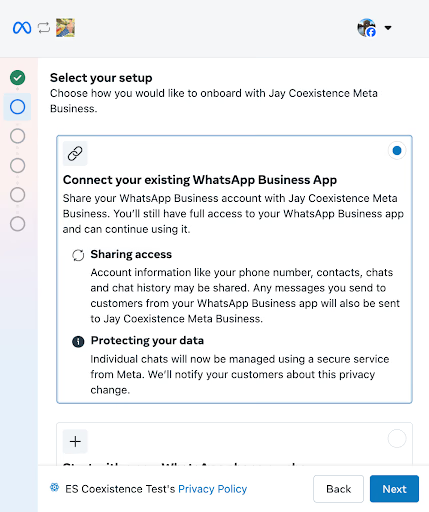
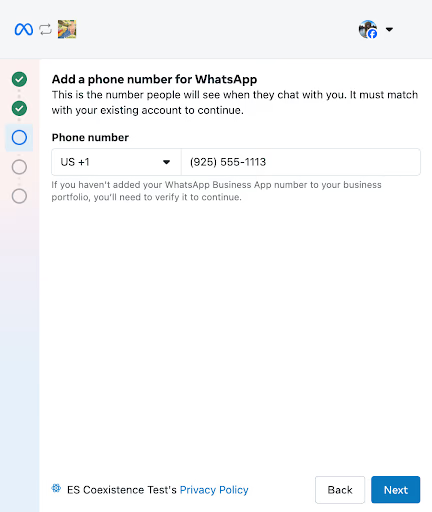
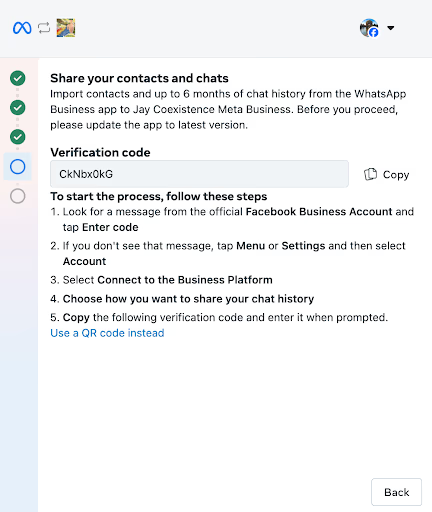
On your phone, approve the connection
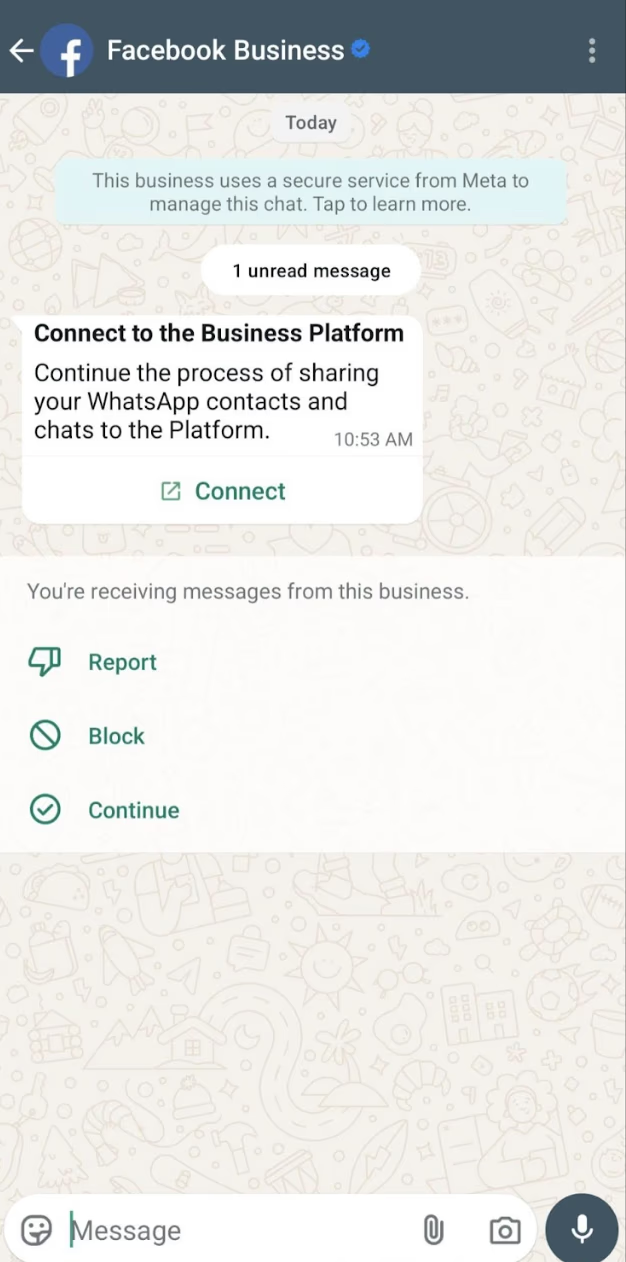
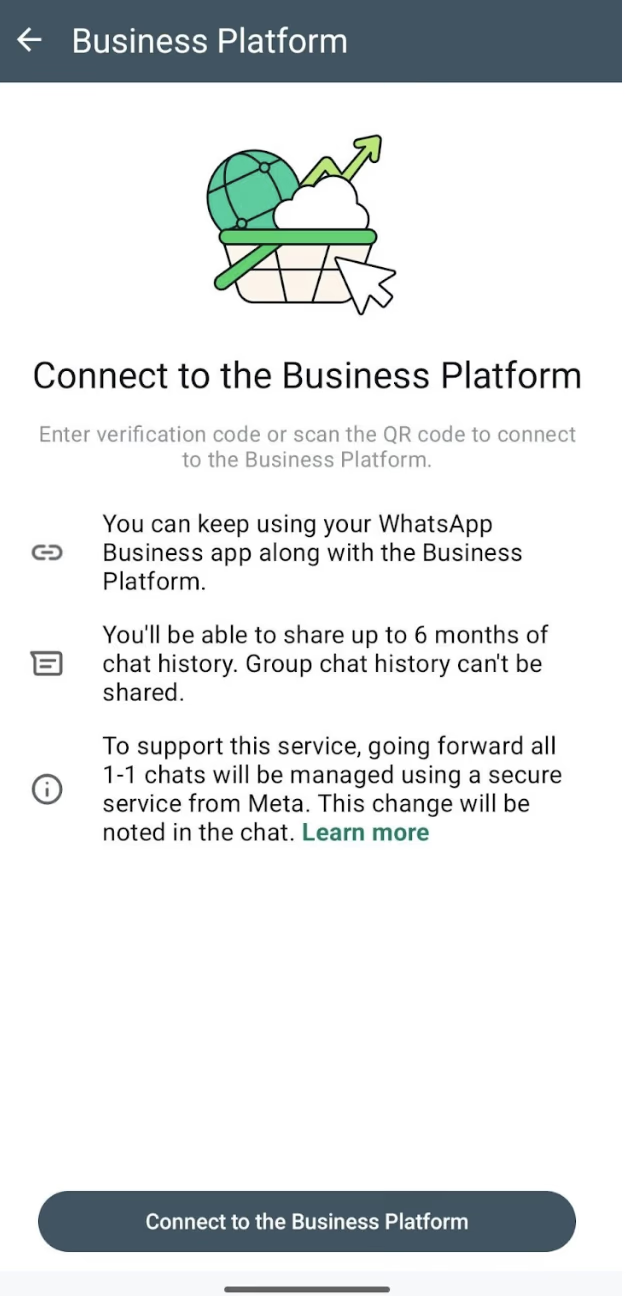
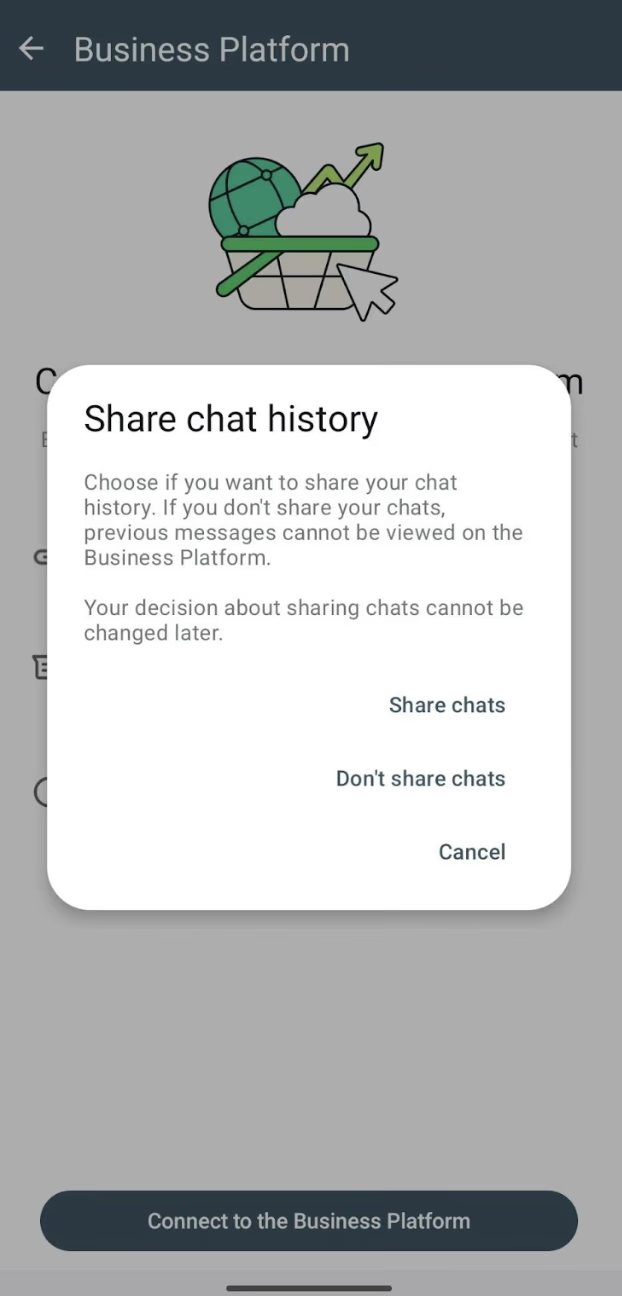
Once you're connected, your number works in both places at once. Within the first 24 hours, SalonBoost runs a one-time sync of your WhatsApp contacts. These are the WhatsApp connection screens every business sees — the business name shown reads SalonBoost when you go through it.
What we built to make it dependable
Two things have to be right on a connected number, or you'd feel it every day. Here is how each one works.
Your inbox never lies
Every message you or your staff send from the phone is mirrored into SalonBoost and tagged "Sent from WhatsApp Business app." Your team can tell a hand-typed reply from an automated one at a glance, and the SalonBoost timeline always matches what you see on your phone.
The contacts sync fires exactly once
Meta gives a single 24-hour window to import your WhatsApp contacts, and it can only run once. We built the sync so a double-tap, a refresh, or a retry can never fire it twice and leave your list half-imported.
It's live on the AI Growth plan, and salons have already moved their existing numbers across — keeping the contact their clients have always messaged while automation handles reminders, offers, and invoices. To switch your number over, start a trial and our team walks you through the connection.
What it costs
Messages you and your staff type by hand from the phone stay completely free — exactly as WhatsApp has always been. Every reply, every conversation you handle yourself, costs nothing. Connecting the number doesn't add a single charge to those.
Automated messages — booking confirmations, reminders, offers, invoices — run through the WhatsApp Cloud API, and Meta charges for those directly. Meta prices them by message type: utility messages like confirmations and reminders are its cheapest category, and marketing messages such as offers cost a little more. You pay Meta's published rate and nothing else — SalonBoost adds no markup, charges no per-message fee of its own, and doesn't meter what you send.
So your cost is two clear lines: a flat ₹1,499/mo for SalonBoost AI Growth — which includes WhatsApp automation, reminders, win-back, loyalty, and GST invoicing — plus Meta's per-message charge only on the automated messages you actually send. No setup fee, no hidden number rental, no surprise metering.
Keep your number. Automate everything on it.
With SalonBoost's WhatsApp automation, reminders, confirmations, win-back, and GST invoices fire off your bookings — now on the number your clients already message.
Connect the WhatsApp number your salon already runs on
Booking confirmations and 24h + 2h reminders that cut no-shows
Win-back offers at 30, 60 and 90 days, sent from your own number
GST invoices and review requests on autopilot
WhatsApp automation is a SalonBoost AI Growth feature.
WhatsApp Coexistence — FAQs
No. With WhatsApp Coexistence you keep the exact WhatsApp Business number your salon already runs on. SalonBoost connects to that same number, so your clients never have to save a new contact and you don’t lose the number they already message you on. This is different from the usual setup, where salon software makes you provision a fresh, dedicated number that nobody has saved yet.
A proper WhatsApp integration for a salon connects your booking software to the WhatsApp Cloud API, which lets it send booking confirmations, reminders, offers, and invoices automatically. With SalonBoost the integration is done for you during setup. The part that trips most salons up is the number: older setups make you add a new, dedicated one. WhatsApp Coexistence removes that step — you integrate your existing WhatsApp Business number, so automation runs on the contact your clients already have saved.
Yes — that is exactly what Coexistence enables. Normally the WhatsApp Cloud API requires a number that isn’t active on any WhatsApp app, which is why most tools hand you a new one. Coexistence removes that requirement: your current WhatsApp Business number connects to the API and keeps working on your phone at the same time. So the same number you already use runs both your hand-typed replies and SalonBoost’s automation.
Yes. That is the defining feature of Coexistence — one number, used in two places at the same time. You send and receive from the WhatsApp Business app on your phone, and SalonBoost sends automated messages through the API on the identical number. Clients see a single, familiar contact, and every message shows up in your SalonBoost inbox regardless of which side sent it.
It lets one WhatsApp Business number be used in two ways at once. You keep chatting with clients by hand from the WhatsApp Business app on your phone, and at the same time SalonBoost sends automated reminders, offers, and invoices through the WhatsApp Cloud API on that same number. Both sides stay in sync, so there is one number and one conversation thread per client.
Yes. That is the whole point. You keep the WhatsApp Business app on your phone and answer clients exactly as you do today. Anything you or your staff send by hand from the phone is mirrored into the SalonBoost inbox and marked “Sent from WhatsApp Business app,” so your automated messages and your real conversations show up as one timeline instead of two disconnected ones.
Very little that a salon actually uses. WhatsApp broadcast lists become read-only — SalonBoost’s approved bulk campaigns replace them, with higher deliverability. Automated sending is capped at 20 messages a second, around 1,200 a minute, far more than a single salon ever needs. Voice and video calls keep working from your WhatsApp Business app exactly as before — only the automation side (the Cloud API) can’t place calls, and no salon automates those anyway. You can still edit and delete messages you’ve sent.
WhatsApp Coexistence is only available to Meta Tech Providers and Solution Partners — a status Meta grants to vetted software companies, which most small booking apps never get. SalonBoost is a Meta Tech Provider, and that status is what makes connecting your existing number possible. It also requires rebuilding onboarding around Meta’s connect-existing flow, which a bolt-on integration can’t easily do.
No. Messages you send by hand from your own phone stay free. The messages SalonBoost automates go through the WhatsApp Cloud API and are billed by Meta at its normal per-message rates — SalonBoost doesn’t add a markup or meter them. WhatsApp automation is part of SalonBoost AI Growth at ₹1,499/mo.
Yes. Offboarding is always in your hands — you disconnect the number from your own WhatsApp Business app whenever you want, and it goes back to a normal single-use number. SalonBoost can’t force-hold a number you’ve connected.
Related Resources
WhatsApp Automation for Salons →
How reminders, confirmations, win-back and invoice dispatch work inside SalonBoost AI Growth.
WhatsApp Marketing Guide →
The complete playbook — bulk campaigns, win-back, invoice dispatch, and 98% open rates for Indian salons.
50+ WhatsApp Message Templates →
Copy-paste templates plus Meta approval rules — booking, reminders, win-back, offers and OTPs.
SalonBoost Pricing →
AI Growth ₹1,499/mo — WhatsApp automation, reminders, win-back, and GST invoicing included.

Founder & CEO, SalonBoost
Swetha has helped 500+ salons and spas streamline operations with SalonBoost salon management software. She writes about salon growth strategies, WhatsApp automation, and the Indian beauty industry.