Never Miss a Salon Task Again — Opening to Closing
Give your salon managers a daily task checklist that ensures every opening duty, closing check, and operational task gets done — on time, by the right person. Assign tasks to staff members, auto-create recurring tasks, and track completion with accountability reports.
SOP and daily checklist software for salons and clinics
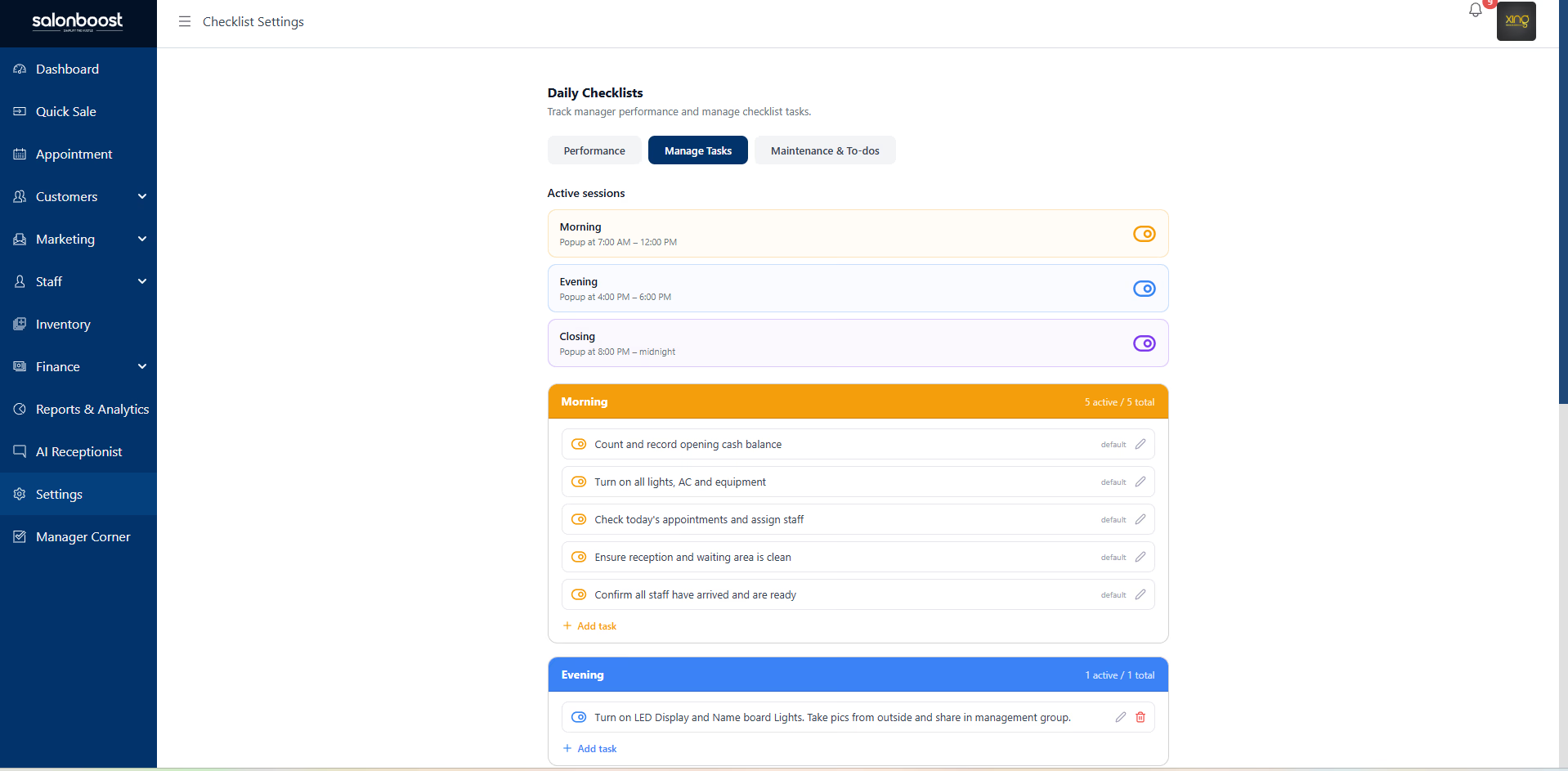
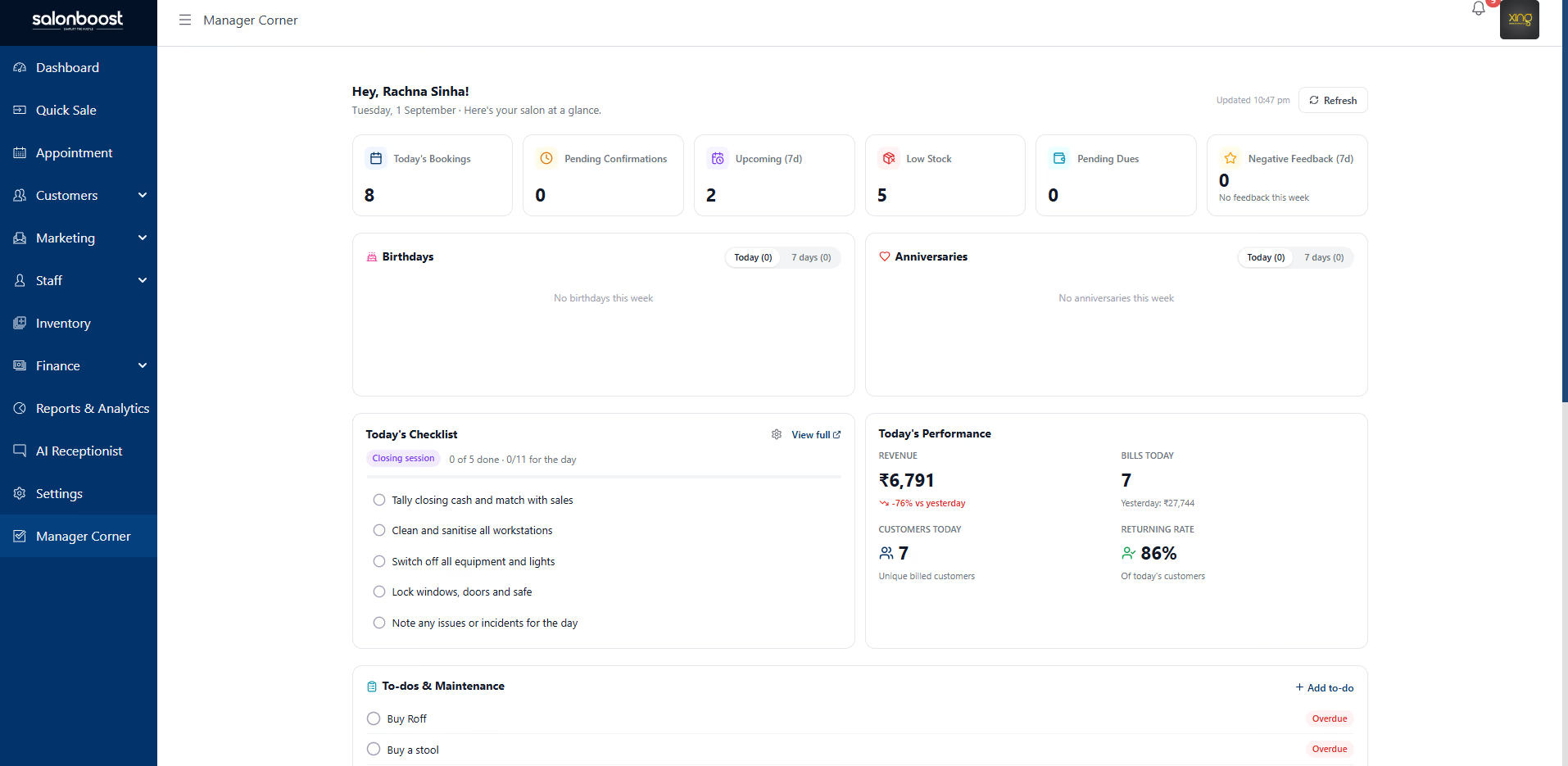
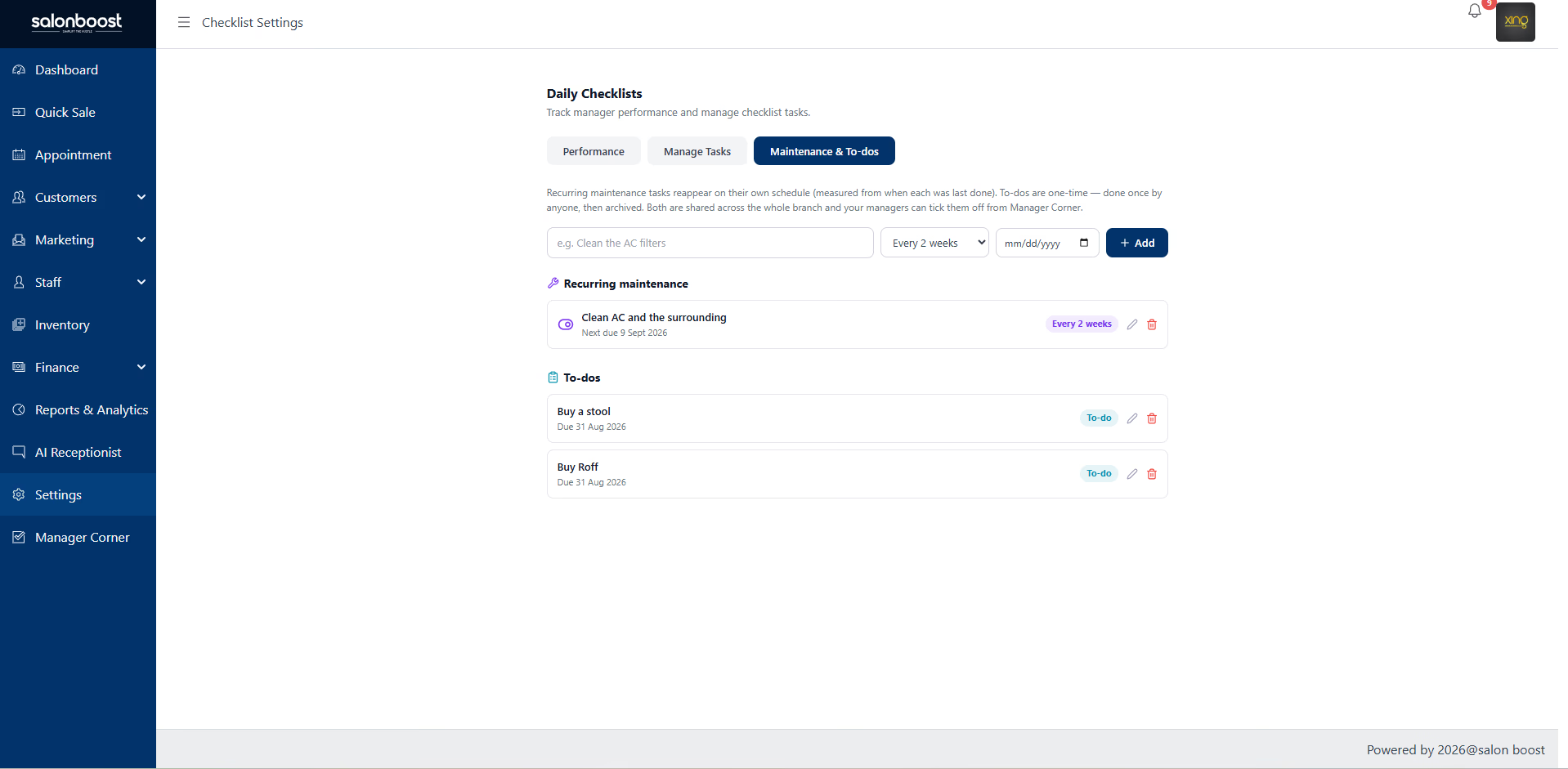
SalonBoost's Daily Checklists run your salon or clinic SOPs on a timed schedule. Managers get three sessions — morning, evening and closing — each with a popup reminder at the right hour. Every task is assigned to a staff member and ticked off with a timestamp. Recurring maintenance and shared to-dos sit alongside them in the Manager Corner dashboard. It's included in SalonBoost AI Growth, from ₹1,499/mo.
The actual screens your managers use
Daily Checklists and Manager Corner, live in SalonBoost.
Every Task Tracked — From Opening to Closing
Stop relying on memory and WhatsApp reminders. SalonBoost's salon management software gives your managers a structured daily checklist that integrates with staff management and analytics.
Daily Task Checklist
Pre-built checklists for opening duties (AC on, music set, towels stocked) and closing duties (cash counted, equipment off, salon locked). Managers see exactly what needs to be done — nothing gets missed.
Opening & ClosingTask Assignment to Staff
Assign specific tasks to individual staff members. Front-desk handles opening cash count, junior stylist stocks towels, senior therapist checks equipment. Everyone knows their responsibility.
Clear OwnershipRecurring Tasks
Set tasks to auto-create daily, weekly, or on specific days. Monday deep-clean, daily cash reconciliation, weekly inventory check — they appear on the checklist automatically without manual setup.
Auto-CreatedTask Completion Tracking
Staff mark tasks as done with a single tap. The system records who completed it and when — giving managers a real-time view of what is done and what is pending for the day.
Real-Time StatusAccountability Reports
Weekly and monthly reports showing task completion rates per staff member. Identify who consistently finishes on time and who needs follow-up — data-driven performance insights.
Staff PerformanceManager Dashboard
A single dashboard showing today's tasks, pending items, overdue tasks, and completion percentage. Managers get a bird's-eye view of salon operations without chasing staff for updates.
Full VisibilityHow Manager Tasks Works
From checklist creation to accountability report — four simple steps.
Create task templates
Set up your salon's daily checklist — opening duties, closing duties, and operational checks. Create templates for different days (weekday vs weekend) and mark tasks as recurring so they auto-appear every day.
Assign to staff
Assign each task to a specific staff member or role. The assigned person sees their tasks on login. Managers can reassign on the fly if someone is absent — no confusion about who does what.
Staff marks completion
Staff members tap to mark tasks as done. The system records who completed the task and the exact timestamp. Managers see real-time progress throughout the day without asking anyone.
Review reports
At week-end or month-end, review completion reports by staff member. See who finishes on time, who misses tasks, and which tasks get skipped most. Use this data for performance reviews and process improvement.
What actually goes on a salon SOP checklist
A salon SOP is only useful when it's specific. Below are the real recurring checklists a premium salon runs every day — the hygiene reset between clients, the towel colour-code, each station's setup, and the equipment replacement schedule. These are the exact lists SalonBoost's Daily Checklists run on a timed schedule, assigned to a named staff member.
The hygiene reset — between every client
- Sterilise every tool that touched the last client — combs, brushes, scissors, clippers (UV or barbicide).
- Open all disposables in front of the client so they see it's fresh — razors, wax strips, thread, sponges are single-use.
- Wipe the station — chair, arms, counter, mirror — and clear every stray hair.
- Lay a fresh towel and a clean cape before the next client sits.
- Check and restock the washroom every 2 hours: soap, tissue, sanitiser, dry floor.
Towel colour-code
| Towel | Used for |
|---|---|
| White | Cut · wash · spa · facial · shave |
| Black | Hair colour |
| Maroon | Head · body · foot massage |
| Purple | Manicure · pedicure |
| Small napkin | Skin |
Equipment service & replacement schedule
| Item | Service / replace |
|---|---|
| Combs, brushes | Wash daily; replace every 15 days (or if bristled) |
| Sterilizer | Service every 6 months; change UV bulb when fused |
| Dryers, steamers, hi-frequency / galvanic units | Service monthly |
| Manicure / pedicure tools, trolleys, trays | Replace every 2 months (at once if rusted) |
| Capes, aprons | Every 2 months |
| Towels, gowns, bed sheets | Every 6 months (at once if faded) |
Station setup — what each station carries before the client sits
Every station is stocked to a fixed list, so a stylist preps it without asking anyone. Manicure and pedicure kits stay separate and are never interchanged.
Hair station
Cape, towel, cutting & colour sheets, water spray, disposable neck roll, sanitiser, cotton & wipes, styling gel/serum. Sterilised combs, vent/paddle/roller brushes, scissors, dryer/iron/tongs, colour bowls & brushes.
Facial / skin room
Big/medium/small towels, disposable bed sheet & headband, gown, mask, rose water, eye pads, sanitiser, cotton & wipes. Steamer, magnifying glass, blackhead remover, hi-frequency/galvanic/ultrasonic unit, facial/bleach/wax kit per client.
Manicure station
Separate manicure kit only. 2 towels, gloves, mask, apron, cuticle cream, acetone, sanitiser, cotton & wipes, nail polish — minimum 20 shades. Nail cutter, filer, cuticle cutter & pusher, buffer, orange stick.
Pedicure station
Separate pedicure kit only — never interchanged with manicure. Towel, gloves, mask, apron, pedi shampoo, cuticle cream, sanitiser, polish (20+ shades). Nail cutter, filer, pumice/ceramic stone, foot scrapper & file, toe separator, buffer.
The salon opening and closing checklist
A salon opening checklist covers everything that must be ready before the first client; a closing checklist covers shutting the salon down safely and squaring off the day. Below is the standard list. In SalonBoost, each line is a timed task assigned to a named staff member and ticked off with a timestamp — so opening and closing never depend on memory.
Salon opening checklist
- Unlock, and switch on lights, AC and music before the first client.
- Power up the billing system, card machine and Wi-Fi.
- Count and record the opening cash float at reception.
- Stock each station with clean towels, capes and fresh disposables.
- Wipe down chairs, counters, mirrors and the washroom; check soap and tissue.
- Switch on and test the steriliser, steamer and dryers.
- Review the day's appointment book and assign cover for walk-ins.
- Check low-stock alerts and pull the day's retail and consumables.
Salon closing checklist
- Reconcile the day's cash, UPI and card takings against the system total.
- Sanitise every tool used and reset each station for tomorrow.
- Send any pending WhatsApp invoices and confirm tomorrow's appointments.
- Switch off dryers, steamers, hi-frequency units and the steriliser.
- Restock towels and disposables; send soiled linen for wash.
- Empty bins, clean the floor and the washroom.
- Confirm the day's billing is closed off in the system.
- Switch off AC, music and lights; lock up and set the alarm.
What is a salon opening and closing checklist?
A salon opening and closing checklist is a fixed list of daily duties that gets the salon ready to open and safely shut down at night. The opening list covers unlocking, switching on AC, lights and music, powering the billing system, counting the cash float, and stocking each station with clean towels and fresh disposables. The closing list covers reconciling the day's cash, UPI and card takings, sanitising tools, switching off equipment, and locking up. SalonBoost runs both as timed checklists assigned to a named staff member.
What is salon staff task management software?
Salon staff task management software assigns daily duties to specific team members, tracks completion with a timestamp, and shows the manager who has done what in real time. SalonBoost assigns each opening, closing and recurring task to a named staff member, records who ticked it off and when, and reports completion rates per person for appraisals. It is part of SalonBoost AI Growth, from ₹1,499/month, with no separate task app to buy.
Why Salon Managers Need a Task System
WhatsApp reminders and verbal instructions don't scale. Here's what structured task management solves for salons.
No More Forgotten Opening Duties
Your salon opens at 10 AM. The AC needs to be on by 9:45, towels stocked, music set, reception area cleaned. Without a checklist, staff forget at least one thing every day. With Manager Tasks, each opening duty is listed, assigned, and tracked — so the salon is fully ready before the first client walks in.
For example: prep tasks like towel stocking are the ones that slip most often. A listed, assigned opening duty is what stops them being forgotten.
Clear Staff Accountability
When closing duties are not assigned to specific people, everyone assumes someone else will do it. Cash reconciliation gets skipped. Equipment stays on overnight. With task assignment, every staff member sees exactly what they are responsible for — and managers know who to follow up with.
For example: when the closing equipment check is assigned to a named therapist instead of 'someone', equipment stops being left running overnight.
Recurring Tasks Run on Autopilot
Monday deep-clean, Wednesday inventory count, daily cash reconciliation — these tasks repeat every week. Instead of creating them manually or sending WhatsApp reminders, set them as recurring once. They auto-appear on the right day, assigned to the right person, without any manager intervention.
For example: a multi-branch salon can take recurring task setup off the manager's plate entirely. Set once, and it repeats on the right day without reminders.
Data-Driven Staff Reviews
During appraisals, salon owners often rely on gut feeling about staff reliability. Manager Tasks gives you hard data — task completion rate, average completion time, missed tasks count. Use this alongside your revenue analytics to make fair, evidence-based performance decisions.
For example: completion-rate data gives owners an objective signal at appraisal time, instead of relying on gut feel about who is reliable.
One Price. Every Tool That Brings Clients Back
An AI Receptionist that books and follows up, automated WhatsApp messages, online booking, Google review protection, GST billing — everything you saw above. One price.
Price Increases In
Everything Included • One Price
SalonBoost Software
Calendar, Billing, GST, POS & Reports
WaBoost
Unlimited Bulk Messaging
WhatsApp Utility Messages
Auto-Invoices & Reminders
One-time setup FREE
WhatsApp API integration + installation & training
AI Growth Price
₹5,299/mo of services for ₹1,499 — plus ₹12,000 of setup free
✓ free trial · Cancel anytime · No contracts
Claim This DealStop Chasing Staff. Start Tracking Tasks.
Give your salon managers a daily checklist that ensures every duty gets done — on time, by the right person. Part of SalonBoost AI Growth, from ₹1,499/mo.
Explore Related SalonBoost Features
Manager Tasks works best when connected to staff management, analytics, and your full salon operations suite.
Staff Attendance & Payroll
QR + WiFi attendance, auto payroll calculation, incentive tracking
Salon Management
Complete salon operations — billing, appointments, CRM, and more
Analytics & Reports
Revenue, staff performance, and client insights in one dashboard
Aesthetic Clinic Software
SOPs, billing, and client records built for skin & aesthetic clinics
Medical Spa Software
Run your med-spa's daily routines, inventory, and staff in one app